Overview Phase 1 — Data Sourcing Phase 2 — Schema & Load Phase 3 — Diagnostics Phase 4 — Optimization Phase 5 — Backup Phase 6 — Security
Phase 06 — Security & User Management

Least Privilege
by Design

I designed and implemented role-based access control for cancer_environment_db using MySQL 8.0 roles. Three roles cover the three access patterns for this database — read-only reporting, analytical querying, and ETL data loading. Every user has exactly the permissions their role requires and nothing more. No application user holds global privileges or schema modification rights.

MySQL 8.0 Roles Least Privilege 3 Roles 3 Users Permissions Audit localhost Only

Three Roles, Three Use Cases

Role-Based Model

I used MySQL 8.0 roles to group privileges so they can be assigned to multiple users without repeating GRANT statements. Privileges are assigned to roles, not directly to users — this makes it straightforward to add users or modify access patterns without rewriting individual grants. Before creating any roles I audited the existing instance and confirmed only four system accounts existed: root, mysql.sys, mysql.session, and mysql.infoschema.

db_readonly
→ readonly_user
Privileges: SELECT on all tables in cancer_environment_db
For Tableau dashboards, reporting queries, and external visualization tools.
db_analyst
→ analyst_user
Privileges: SELECT + CREATE TEMPORARY TABLES on cancer_environment_db
For ad-hoc analytical queries with intermediate result materialization.
db_etl
→ etl_user
Privileges: SELECT, INSERT, UPDATE, DELETE on all tables
For Python ETL pipelines loading and refreshing data. No schema modification rights.

Roles, Users & Grants

Creating Roles and Assigning Users

Each user was created with a strong password following complexity requirements, bound to localhost only, and assigned exactly one role as their default role. No user was granted privileges directly — all access flows through the role assignment.

-- Create roles CREATE ROLE IF NOT EXISTS 'db_readonly'; CREATE ROLE IF NOT EXISTS 'db_analyst'; CREATE ROLE IF NOT EXISTS 'db_etl'; -- Grant privileges to roles GRANT SELECT ON cancer_environment_db.* TO 'db_readonly'; GRANT SELECT, CREATE TEMPORARY TABLES ON cancer_environment_db.* TO 'db_analyst'; GRANT SELECT, INSERT, UPDATE, DELETE ON cancer_environment_db.* TO 'db_etl'; -- Create users and assign roles CREATE USER 'readonly_user'@'localhost' IDENTIFIED BY '...'; GRANT 'db_readonly' TO 'readonly_user'@'localhost'; ALTER USER 'readonly_user'@'localhost' DEFAULT ROLE 'db_readonly';
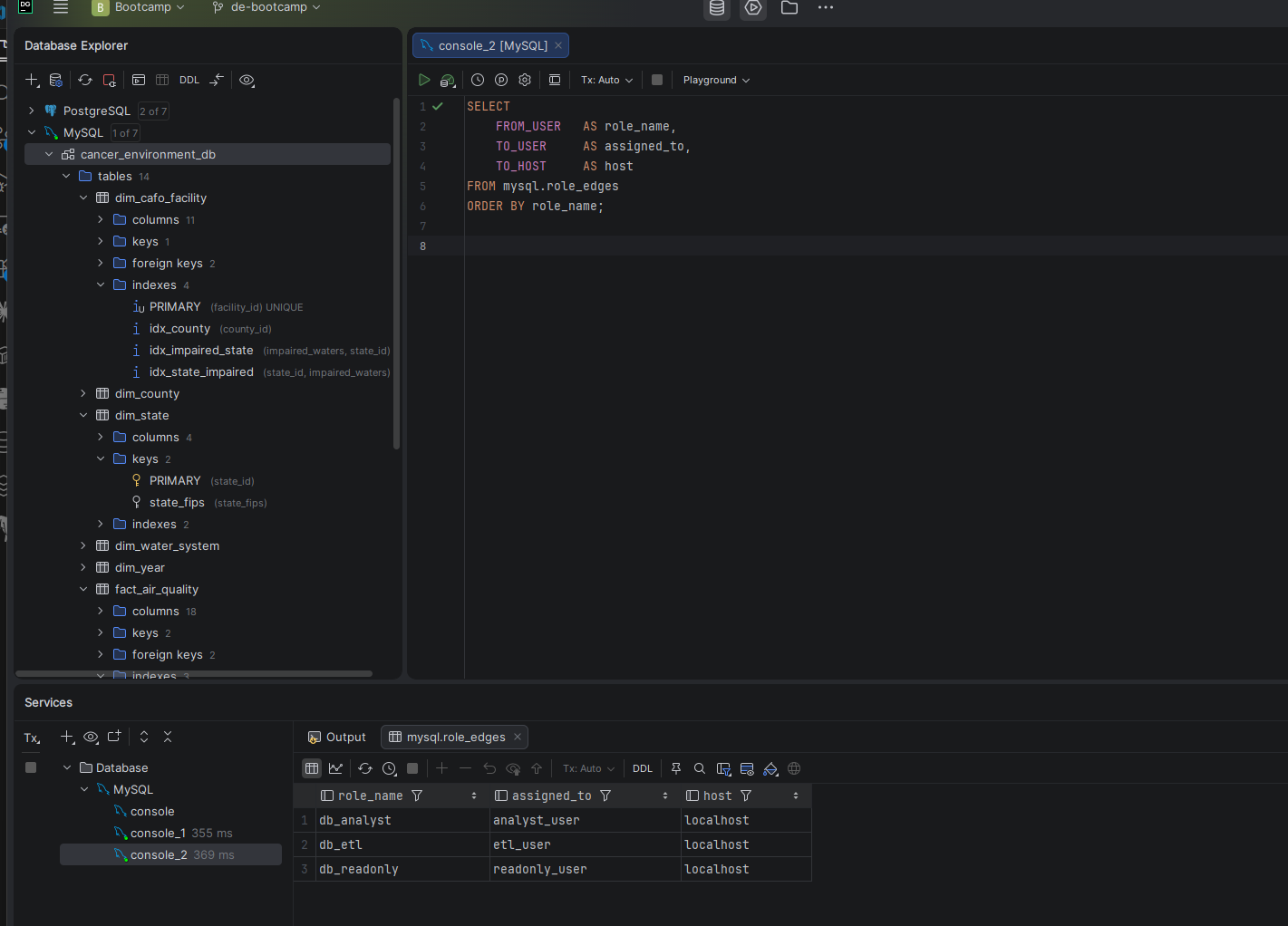
Screenshot — Role assignments from mysql.role_edges
Role assignments showing db_analyst to analyst_user, db_etl to etl_user, db_readonly to readonly_user
Role assignments confirmed via mysql.role_edges — one role per user, correctly assigned
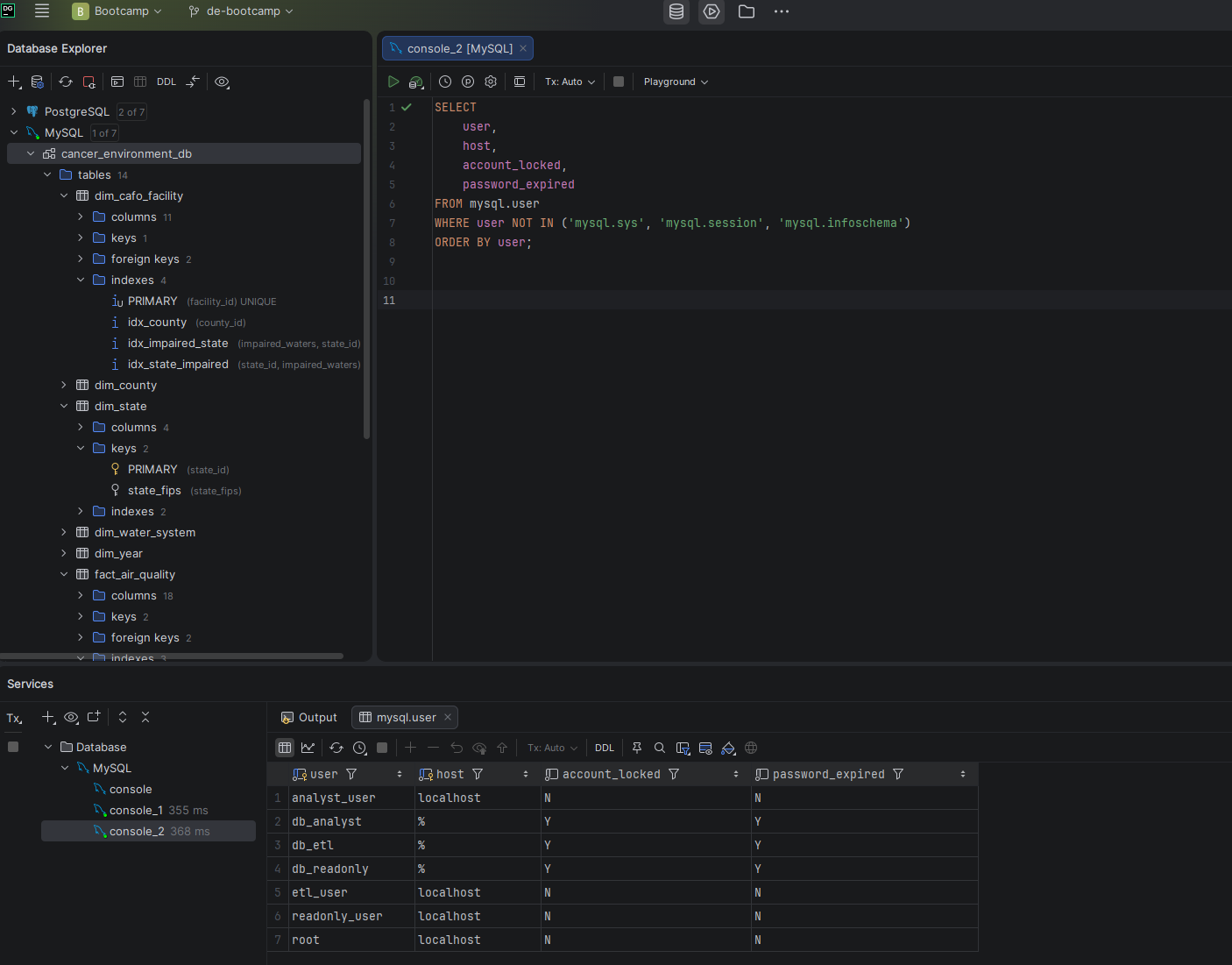
Screenshot — User inventory
User inventory showing analyst_user, etl_user, and readonly_user
Three application users — all active, localhost only, passwords set, no account locks

Verifying Least Privilege

Global Privilege Audit

After creating all roles and users I ran a full permissions audit to verify no application user holds global privileges. Every column in the global privilege check returned N for all three users and all three roles.

User / RoleSELECTINSERTUPDATEDELETECREATEDROPSUPER
db_readonly✓ (db only)
db_analyst✓ (db only)
db_etl✓ (db only)✓ (db only)✓ (db only)✓ (db only)

Security Principles Applied

PrincipleImplementation
Least PrivilegeEvery user has exactly the permissions their role requires — nothing more
Role-Based DesignPrivileges assigned to roles, not users — easy to manage and audit
No Remote AccessAll users bound to localhost — no external connections permitted
No Schema PrivilegesNo application user can CREATE, DROP, or ALTER tables
Password ComplexityAll passwords include uppercase, lowercase, numbers, and special characters
Default RolesALTER USER DEFAULT ROLE ensures roles activate automatically on login