Overview Phase 1 — Schema & Load Phase 2 — Diagnostics Phase 3 — Optimization Phase 4 — Operations Phase 5 — Security
Phase 01 — Schema Design & Data Loading

Building the Foundation

I designed a normalized PostgreSQL schema for a healthcare analytics workload, loaded 9.6 million CMS Medicare records using a staged bulk-load approach, and validated the data before moving forward. Every design decision is documented with a rationale.

Schema Design COPY Bulk Load Data Normalization Data Validation 9.6M Rows

What I Did in Phase 1

The Dataset

I used the CMS Medicare Physician & Other Practitioners by Provider and Service dataset for 2023. Before writing a single line of SQL I inspected the raw CSV — 27 columns, 9.6 million rows, 3 GB on disk. Understanding the data structure first is what leads to good schema decisions.

The Approach

Rather than loading the raw file directly into a production table, I used a staged loading strategy — land everything into a staging table first, then deduplicate and transform into the final normalized tables. This gives full control over data quality before anything touches the curated schema.

9.66M
Raw Rows Loaded
1.17M
Unique Providers
57s
Staging Load Time
0
Data Integrity Errors

Design Decisions & Rationale

Why a Separate Schema?

I created a dedicated cms schema rather than using the default public schema. In production environments it is standard practice to isolate project objects in their own schema for clarity, access control, and maintainability. It also makes role-based permissions cleaner — you can grant access to an entire schema rather than individual tables.

Decision 01
Normalized Two-Table Design
The source data is flat — provider attributes repeat on every service row. I split this into cms.providers (one row per NPI) and cms.provider_services (one row per provider/procedure). This eliminates redundancy and reflects how a production DBA would model this data.
Decision 02
NPI as VARCHAR(10)
The NPI is stored as VARCHAR(10), not INTEGER or BIGINT. NPIs are identifiers — they are never used in calculations. Storing them as text avoids leading-zero issues and makes the intent clear to anyone reading the schema.
Decision 03
BIGSERIAL Surrogate Key
I added a BIGSERIAL surrogate key on provider_services because the natural key (NPI + HCPCS code) is not enforced as unique in the source data — a provider can appear multiple times for the same procedure code.
Decision 04
NUMERIC for Payment Columns
Payment and charge columns use NUMERIC(12,2) for exact decimal precision. FLOAT would introduce rounding errors for financial data. RUCA codes use NUMERIC(4,1) to accommodate decimal values in the source data.

Staged Bulk Load Strategy

Why Stage First?

Loading raw CSV data directly into a typed production table risks rejecting rows due to type mismatches or unexpected values. By staging everything as VARCHAR first, I could inspect the data, handle edge cases like empty strings in numeric columns using NULLIF, and deduplicate providers before inserting into the final tables.

The COPY Command

I used PostgreSQL's COPY command for the initial bulk load — significantly faster than row-by-row INSERT for large files. The 3 GB CSV file loaded into the staging table in 57 seconds.

COPY cms.staging_raw FROM 'C:\temp\MUP_PHY_R25_P05_V20_D23_Prov_Svc.csv' WITH ( FORMAT CSV, HEADER true, DELIMITER ',', QUOTE '"', ENCODING 'WIN1252' );

Load Results

Step Rows Duration
Staging load (COPY) 9,660,647 57 seconds
Providers insert (deduplicated) 1,175,281 42 seconds
Provider services insert 9,660,647 2 min 59 sec

Data Loaded & Validated

Row Count Verification

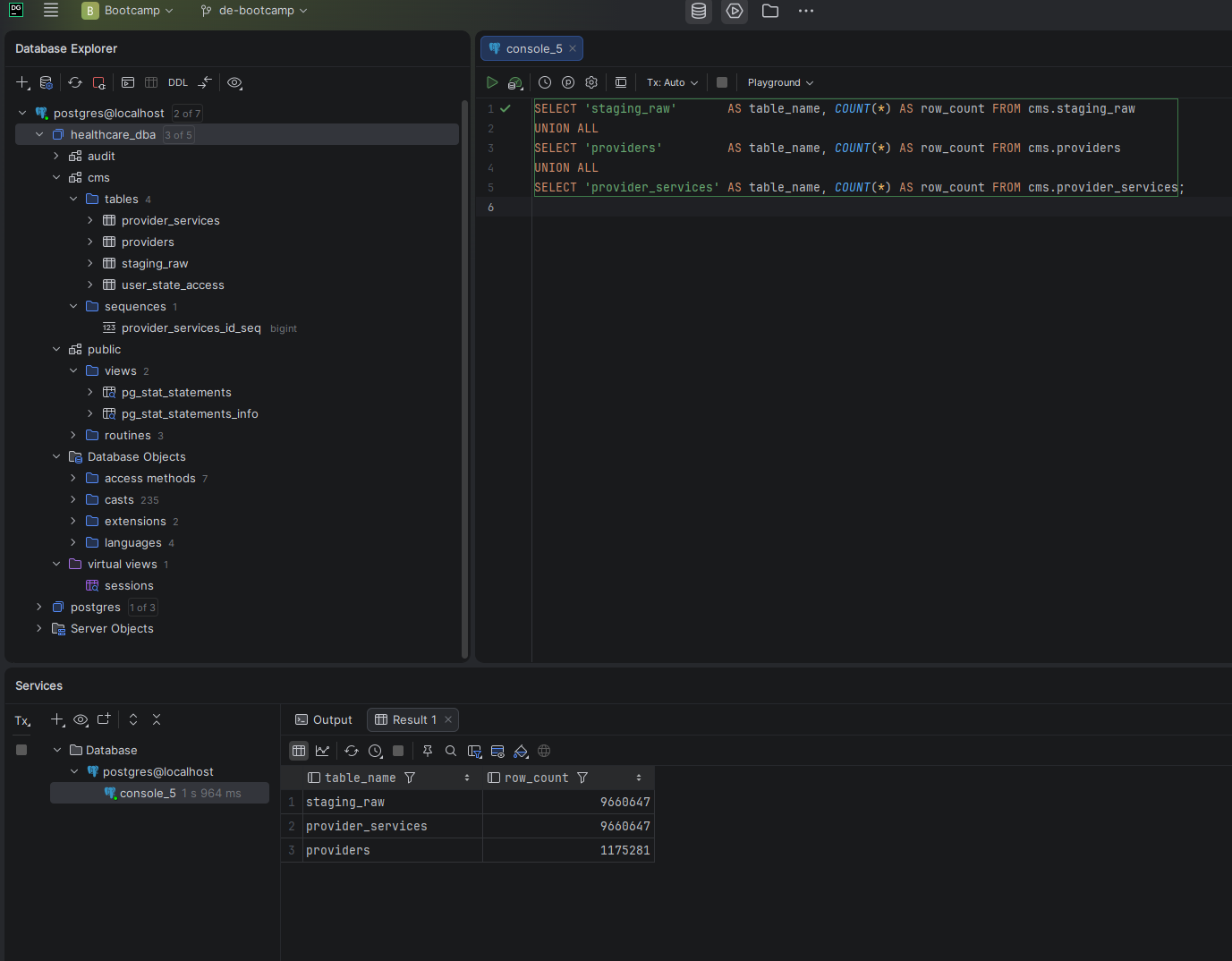
After loading I verified row counts across all three tables to confirm the staging table and services table match exactly, and the providers table correctly deduplicated to unique NPIs.

Screenshot — Row counts across all tables
Row counts for staging_raw, providers, and provider_services tables
All three tables confirmed — 9,660,647 service rows, 1,175,281 unique providers
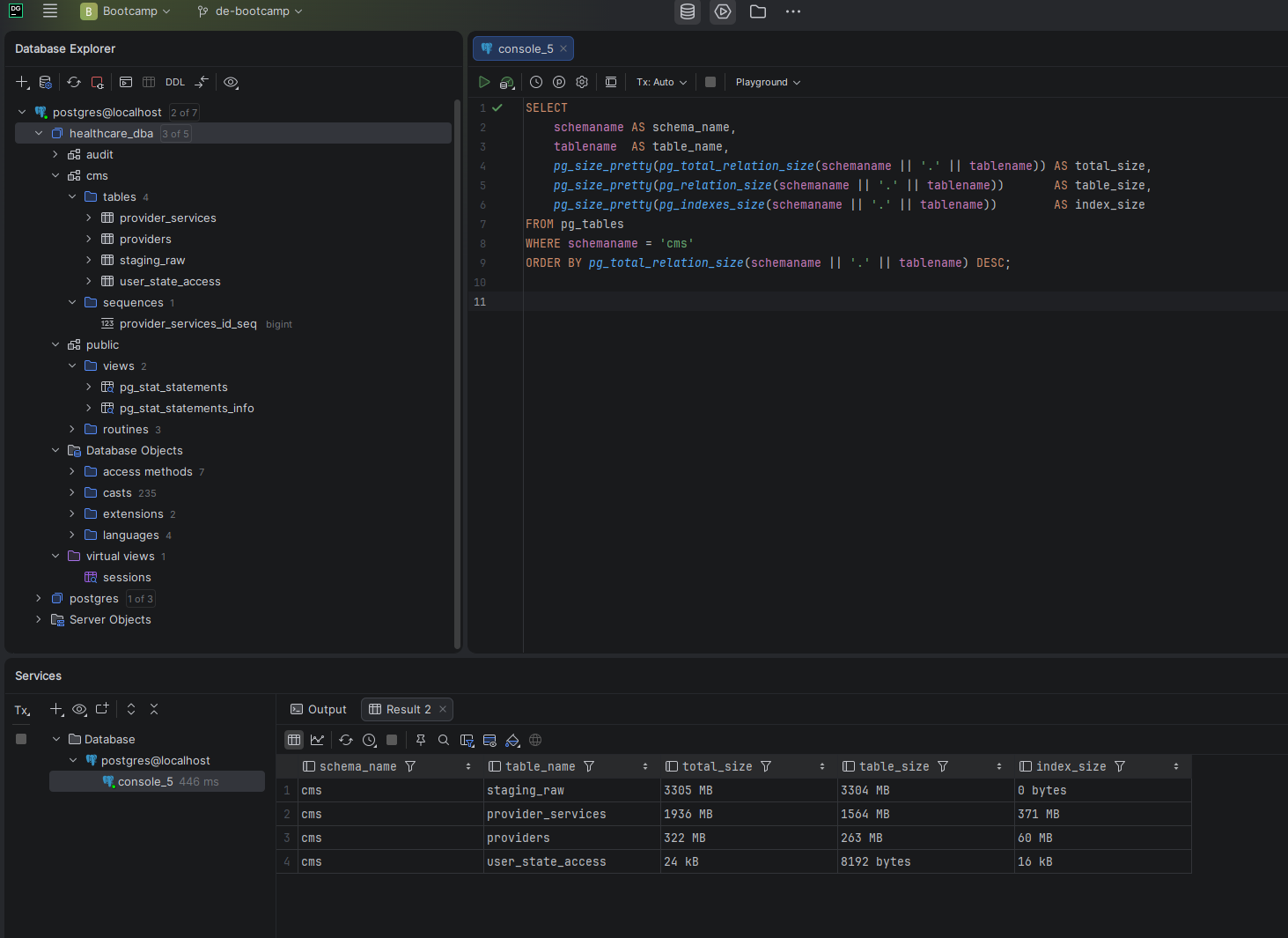
Screenshot — Table sizes after load
Table sizes showing staging_raw at 3.3GB, provider_services at 1.7GB, providers at 298MB
Total database size: 5,571 MB — staging_raw at 3.3 GB, provider_services at 1.7 GB, providers at 298 MB

Validation Results

Check Result
Null NPIs in providers0
Orphaned service rows0
Null HCPCS codes0
Null beneficiary counts0
Min Medicare payment$0.00
Max Medicare payment$42,059.52
Avg Medicare payment$82.99
Total Medicare payments$801,745,767.09